
Latest Version
Update
September 30, 2025
September 30, 2025
Developer
EK Watch Faces™
EK Watch Faces™
Categories
Internet
Internet
Platforms
Android
Android
Downloads
0
0
License
$1.99
$1.99
Package Name
com.ekwatchfaces.modulararcade
com.ekwatchfaces.modulararcade
Report
Report a Problem
Report a Problem
More About Modular Arcade - Watch Face
🌟 Built for Wear OS
[ Only for Wear OS devices - API 33+ ]
📌 INSTALLATION NOTES:
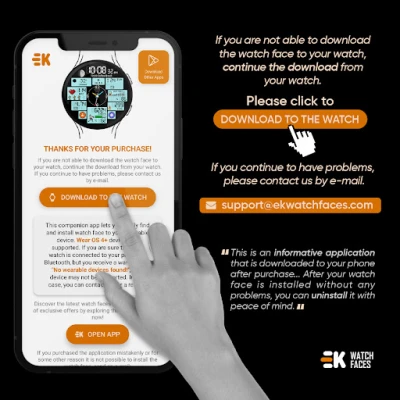
1 - 🔗 Ensure your watch is properly connected to your phone. Open the Phone App on your phone and tap on "DOWNLOAD TO THE WATCH", then follow the instructions on your watch.
⌛ A few minutes after tapping the install button on your watch, the watch face will be installed. You can then select your new watch face!
📱 The phone app serves as a placeholder to make it easier to install and find the watch face on your Wear OS device.
⚠️ Note: If you find yourself stuck in a payment loop, don’t worry! You will only be charged once, even if prompted to pay again. Wait 5 minutes or restart your watch and try again. This could be a synchronization issue between your device and Google servers.
2 - 💻 Alternatively, you can try installing the watch face from a web browser on your PC.
⚠️ Please note that any issues on this side are NOT developer-dependent. The developer has no control over the Play Store from this side. Thank you.
🧟 Which one is you? Enjoy it!
FEATURES
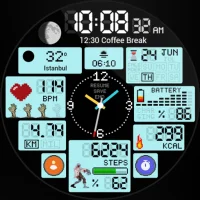
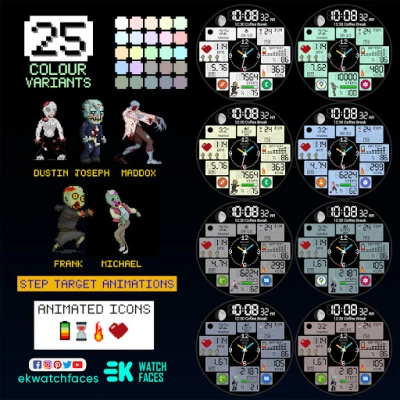
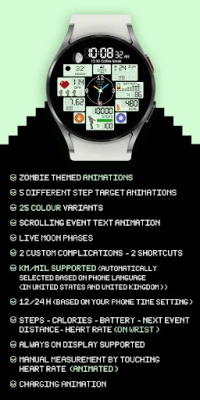
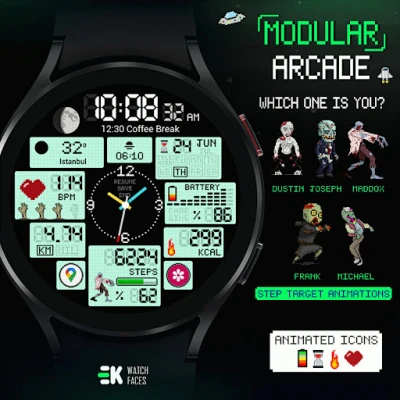
● 🧟 Zombie themed animations
● 🚶♂️ 5 different step target animations
● 🎨 25 Colour variants
● 📺 Scrolling event text animation
● 🌕 Live moon phases
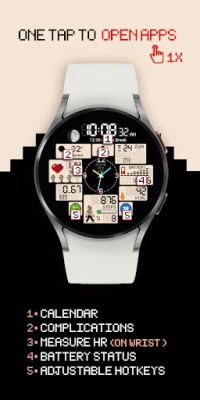
● 🖱️ 2 custom complications - 2 shortcuts
● 🚧 Km/Mil supported (Automatically selected based on phone language (in United States and United Kingdom))
● 🕒 12/24 H (Based on your phone time setting)
● 📊 Steps - Calories - Battery - Next Event - Distance - Heart rate (On wrist)
● 👀 Always on display supported
● ⚡ Charging animation
🔑 For full functionality, please manually enable Sensors & receive complication data permissions!
WEB
https://www.ekwatchfaces.com
INSTAGRAM
https://www.instagram.com/ekwatchfaces
FACEBOOK
https://www.facebook.com/ekwatchfaces
TWITTER
https://twitter.com/ekwatchfaces
PINTEREST
https://www.pinterest.com/ekwatchfaces
YOUTUBE
https://bit.ly/2TowlDE
📌 INSTALLATION NOTES:
1 - 🔗 Ensure your watch is properly connected to your phone. Open the Phone App on your phone and tap on "DOWNLOAD TO THE WATCH", then follow the instructions on your watch.
⌛ A few minutes after tapping the install button on your watch, the watch face will be installed. You can then select your new watch face!
📱 The phone app serves as a placeholder to make it easier to install and find the watch face on your Wear OS device.
⚠️ Note: If you find yourself stuck in a payment loop, don’t worry! You will only be charged once, even if prompted to pay again. Wait 5 minutes or restart your watch and try again. This could be a synchronization issue between your device and Google servers.
2 - 💻 Alternatively, you can try installing the watch face from a web browser on your PC.
⚠️ Please note that any issues on this side are NOT developer-dependent. The developer has no control over the Play Store from this side. Thank you.
🧟 Which one is you? Enjoy it!
FEATURES
● 🧟 Zombie themed animations
● 🚶♂️ 5 different step target animations
● 🎨 25 Colour variants
● 📺 Scrolling event text animation
● 🌕 Live moon phases
● 🖱️ 2 custom complications - 2 shortcuts
● 🚧 Km/Mil supported (Automatically selected based on phone language (in United States and United Kingdom))
● 🕒 12/24 H (Based on your phone time setting)
● 📊 Steps - Calories - Battery - Next Event - Distance - Heart rate (On wrist)
● 👀 Always on display supported
● ⚡ Charging animation
🔑 For full functionality, please manually enable Sensors & receive complication data permissions!
WEB
https://www.ekwatchfaces.com
https://www.instagram.com/ekwatchfaces
https://www.facebook.com/ekwatchfaces
https://twitter.com/ekwatchfaces
https://www.pinterest.com/ekwatchfaces
YOUTUBE
https://bit.ly/2TowlDE
Rate the App
Add Comment & Review
User Reviews
Based on 0 reviews
No reviews added yet.
Comments will not be approved to be posted if they are SPAM, abusive, off-topic, use profanity, contain a personal attack, or promote hate of any kind.








More »

Popular Apps

KeyBank Mobile BankingKeyBank, N.A.
Themes-Wallpaper&Icons&WidgetsInnova Tool

Messenger Kids – The MessagingMeta Platforms, Inc.

MetaTrader 4 Forex TradingMetaQuotes Software Corp.

Total War: EMPIREFeral Interactive

Article PublisherComplete_Apps
Building Wire Reliability CalcSouthwire Company

Microsoft Word: Edit DocumentsMicrosoft Corporation
1 EuroOne Coin Apps

Trademark FCUTrademark Mobile
More »
Editor's Choice
Logistics ClusterWorld Food Programme

Jim FitnessEGYM
Joy In Movement (J.I.M)Hapana

Picasso UTCBureau des Etudiants de l'UTC

Intellecto Kids Learning GamesIntellectoKids Ltd
Google Family LinkGoogle LLC

Dynamics 365 Field ServiceMicrosoft Corporation

The Art of Leadership AcademyMighty Networks

Maxwell Leadership AppMaxwell Leadership

Fordys PupilGoRoadie